News & Insights
LED Light Box Troubleshooting Guide
Diagnose common LED light box problems including flickering, dark areas, uneven brightness and power failure. Learn safe checks and what to tell your supplier.
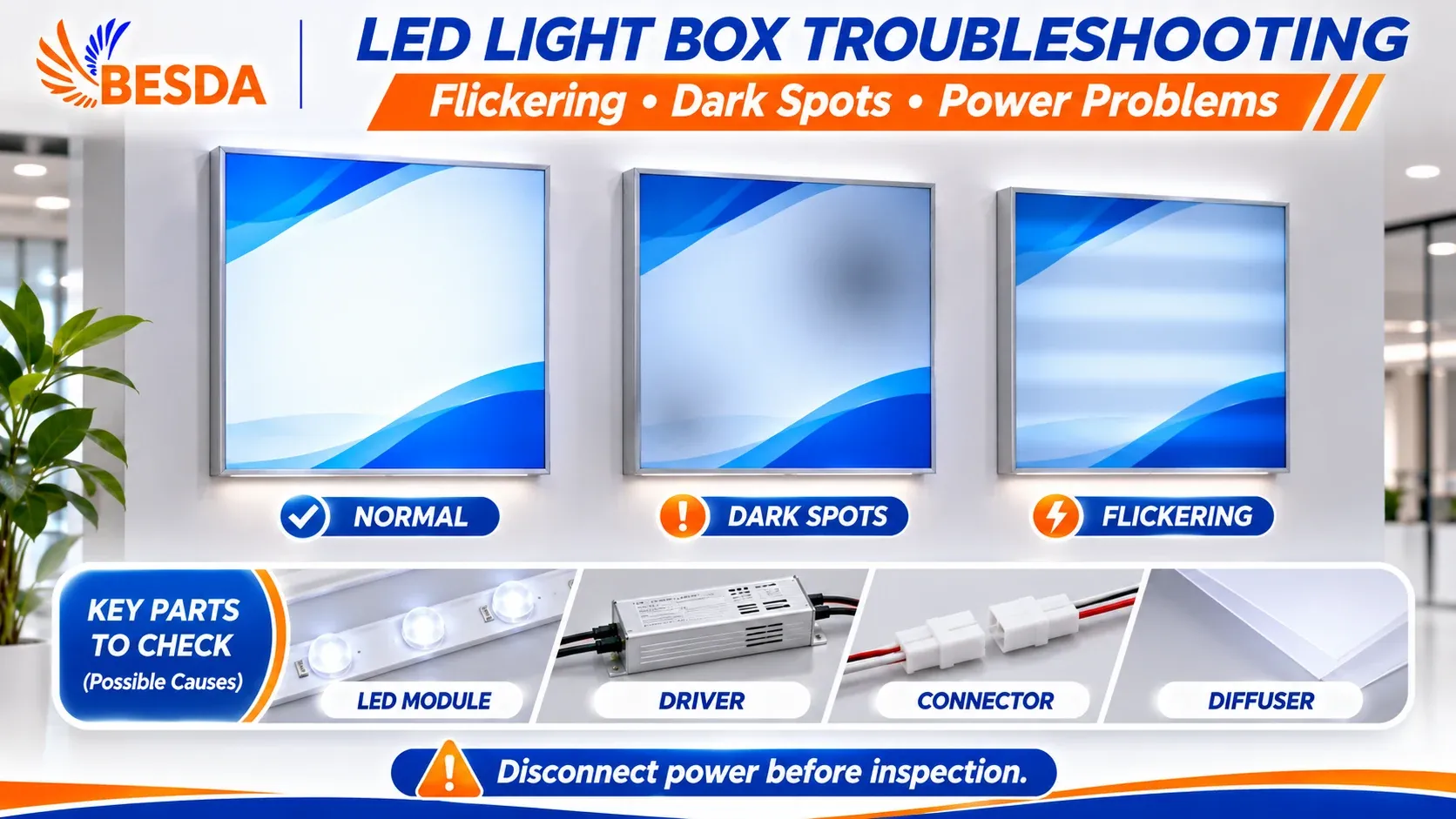
A light box that flickers, develops dark patches or stops illuminating can disrupt a retail campaign or exhibition. The visible symptom does not always identify the failed component. A dark section may be caused by an LED module, connector, wiring or power distribution issue; a color or brightness difference may instead involve the graphic, diffuser or LED source. This guide helps buyers document the problem and decide what to check safely.
Understand the Main Parts of an LED Light Box
An LED light box generally includes a frame or cabinet, LED light source, driver or power supply, wiring and connectors, diffuser or optical components, and a graphic face. Some products use SEG fabric, magnetic panels, acrylic or other graphic systems. Before troubleshooting, identify the exact model and construction. Edge-lit and direct-backlit systems use different optical layouts, and a magnetic poster light box is not serviced in the same way as a large SEG frame.
Why Does an LED Light Box Flicker?
Flickering can be associated with an unstable or unsuitable power source, a failing driver, loose connector, damaged cable, poor electrical contact, incompatible dimmer or control, or a problem in the LED circuit. The cause cannot be confirmed from the symptom alone. Record when flickering occurs: immediately after switch-on, after warming up, at a particular brightness setting, when other equipment starts, or intermittently. Note whether the entire face flickers or only one area. This information helps a qualified technician isolate the system.
Why Are There Dark Spots or Uneven Brightness?
Dark spots may result from failed LED sections, damaged wiring, poor connector contact, uneven LED spacing, optical obstruction, diffuser damage or an unsuitable graphic. Bright hotspots can be caused by optical distance, diffuser design or LED placement. Check whether the dark area stays in the same location when the graphic is removed or changed, if the product design permits safe graphic removal. If the problem remains in the light engine, it is less likely to be caused by the printed fabric alone. Do not dismantle electrical parts while the unit is connected to power.
Why Does the Graphic Look Too Dim or Change Color?
The graphic may be the wrong material for backlighting, too opaque, incorrectly printed, or installed with the wrong orientation. LED color temperature and the light box's optical construction can also change perceived color. Compare the print under the intended lighting, not only under room light. If the entire panel looks dim, confirm the power input and model specification with the supplier. If only the printed image looks wrong while illumination is even, review the fabric type, print profile and approved sample.
Safe Checks Before Contacting the Supplier
Switch off and unplug the unit before inspecting external cables or removable accessories. Check that the power source matches the product label, the plug and cable are undamaged, connectors are fully seated where user-accessible, ventilation openings are not blocked, and the switch or external controller is in the correct position. Do not open the driver enclosure, touch exposed conductors, bypass protective components or work on energized equipment. Electrical diagnosis and component replacement should be performed by a qualified person following the manufacturer's instructions and local electrical requirements.
What Information Helps Diagnose the Fault?
Send the supplier the model number, serial or order reference, destination power standard, installation date, operating hours, symptom description, photos of the full display and close-ups of the affected area. A short video can help show flickering or intermittent behaviour. Also report whether the problem affects the full panel or a section, whether it changes after warm-up, whether the graphic has recently been replaced, and whether the unit has been moved or exposed to moisture or impact. Do not ship a damaged electrical unit without agreeing on safe packing and return instructions.
How to Reduce Future Light Box Problems
Confirm input voltage and frequency before installation. Use the specified driver and approved accessories. Keep ventilation paths clear, protect cables from crushing and abrasion, avoid moisture unless the model is specifically rated for the environment, and follow the stated duty cycle and installation instructions. For bulk or multi-site projects, keep model numbers, driver specifications, wiring diagrams, spare-part codes and installation photos in the project file. Request a sample or production test for the exact model before committing to a rollout.
Quick Comparison
Whole unit flickers — Possible causes: Power source, driver, control, connection; Information to record: When it occurs; power label; video.
One area is dark — Possible causes: LED section, connector, wiring, obstruction; Information to record: Exact location; photo; whether graphic was changed.
Uneven brightness — Possible causes: LED spacing, optics, diffuser, frame depth; Information to record: Full-face photo in a darkened room.
Graphic looks dim — Possible causes: Wrong fabric, print, orientation or light output; Information to record: Graphic material and illuminated sample.
Unit will not turn on — Possible causes: Power input, switch, cable, driver or circuit; Information to record: Model, input rating, cable condition.
Frequently Asked Questions
Why is my LED light box flickering?
Possible causes include an unsuitable power source, driver fault, loose connection, control incompatibility or LED circuit issue. Record the symptom and have electrical checks performed by a qualified technician.
What causes dark spots in an LED light box?
Potential causes include failed LEDs, wiring or connector problems, optical obstruction, diffuser issues or uneven light distribution. Determine whether the dark area is in the light engine or the graphic.
Can I replace an LED light box power supply myself?
Only if the manufacturer provides an approved procedure and the work is performed by a qualified person. Disconnect power and do not open or repair energized equipment.
Does the printed fabric affect LED light box brightness?
Yes. Fabric opacity, material, print density and orientation influence transmitted light and perceived brightness. Confirm that the graphic is intended for the specific backlit system.
Why Work With BESDA?
BESDA supplies custom flags, advertising tents, LED light boxes and portable trade show displays for B2B projects. The most useful supplier discussion starts with the real application, dimensions, artwork, hardware, installation environment, packing and delivery requirements. Product-specific specifications and compatibility should be confirmed in the approved quotation and production documents. Need help specifying or diagnosing an LED light box? Send BESDA the model, frame size, input power label, photos or video of the symptom, graphic type, destination and quantity. We can help identify the information needed for a product-specific review.
Related BESDA resources
Deeper reading on this site: BESDA LED Light Boxes, BESDA Quality Control, BESDA Factory Tour and BESDA FAQ.
Next step
Send us your application, sizes, quantity, artwork status and destination, and we will reply with a specification-led quotation and a confirmed production schedule.
You can reach us on WhatsApp or by email, or use the form on the contact page for a recommendation within one working day.