News & Insights
LED Light Box Power Supply Guide
Learn how to match LED light box power supplies by output voltage, current, wattage, driver type, dimming, connectors, ventilation and destination-market requirements.
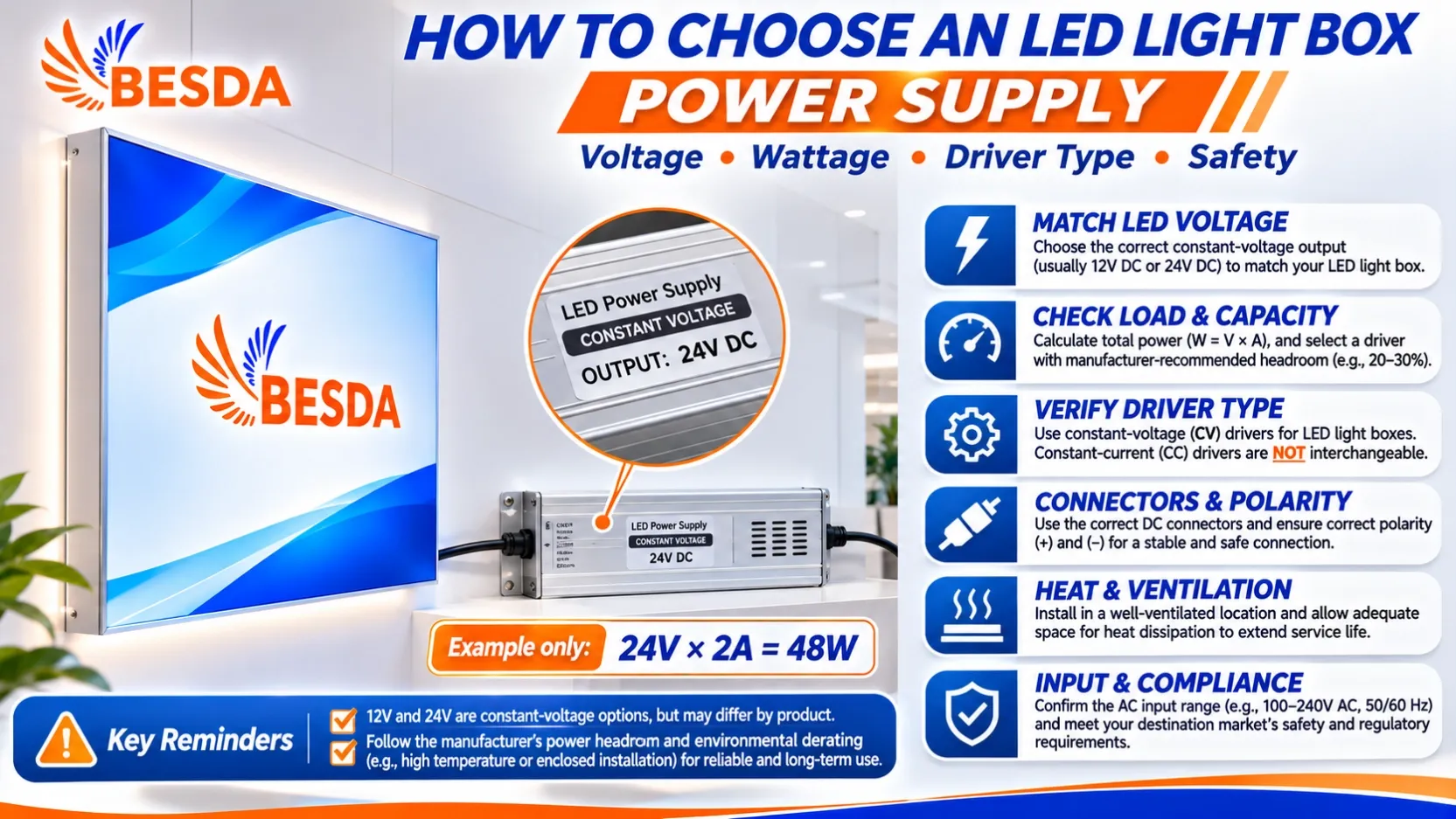
A light box can have a good frame, fabric and LED layout but still fail if the power supply is mismatched. Incorrect voltage, insufficient capacity, unsuitable driver type or poor wiring can cause flicker, overheating, reduced brightness or premature failure. The safest way to specify a replacement or new driver is to start with the LED assembly's electrical data—not the size of the light box alone.
What Does the Power Supply Do?
The LED power supply, often called an LED driver or adapter, converts the available input electricity into the output required by the LED system. Depending on the LED design, the system may require constant voltage or constant current. These are not interchangeable operating modes. Read the LED module or strip datasheet and the existing driver label. If the information is missing, ask the manufacturer or a qualified technician to identify the load before replacement.
Constant Voltage vs Constant Current
A constant-voltage system is designed to receive a specified voltage, commonly a low-voltage DC rating such as 12V or 24V. The LED modules or strips then draw current according to their design. A constant-current system requires a driver that regulates the specified current across its operating voltage range. Do not replace a constant-current driver with a constant-voltage adapter just because the connector fits. Match the driver type and the LED assembly's electrical specification.
Understand Voltage, Current and Wattage
Voltage is measured in volts (V), current in amperes (A), and electrical power in watts (W). For a DC load, a basic relationship is watts = volts × amps. For example, a 24V system drawing 2A uses 48W of electrical power. This calculation helps estimate capacity, but the actual driver must also match the LED system's operating mode, voltage range, current limits and manufacturer instructions.
Calculate the Required Power
Add the rated power of all LED modules or strips connected to the supply, using the actual configuration. Then select a driver with sufficient capacity according to the LED and driver manufacturers' guidance. Some manufacturers recommend operating below full rated load; the correct margin depends on ambient temperature, enclosure, duty cycle and model. Example for illustration only: if a specified 24V constant-voltage LED load totals 60W, its nominal current is 60W ÷ 24V = 2.5A. A suitable supply must meet the manufacturer's recommended capacity and environmental derating. Do not treat one universal percentage margin as a substitute for the datasheet.
Check Input Voltage and Destination Market
Confirm the driver's AC input range, frequency, plug, cable, grounding or double-insulation requirements, and any applicable approvals for the destination. A unit designed for one market may not be suitable for another without the correct input rating and compliance documentation. For projects in multiple countries, specify the destination market for each shipment. Ask for the exact driver model and certificates or declarations relevant to the finished product and installation.
Connectors, Polarity and Cable Length
Check connector type, pin assignment, polarity, wire gauge, cable length and the number of output branches. A plug that physically fits can still have the wrong polarity or pin arrangement. For long low-voltage cable runs, voltage drop may reduce brightness or create uneven performance. Do not splice or modify mains wiring without qualified personnel. Request a wiring diagram and labeled connectors for the actual light-box configuration.
Dimming, Flicker and Noise
If dimming is required, confirm the method: compatible dimmable driver, PWM, 0–10V, DALI or another control system. The dimmer and driver must be designed to work together. Flicker can result from driver quality, load mismatch, control incompatibility or wiring issues. Ask whether the light box is intended for photography or video use, where flicker may be especially noticeable. Request a demonstration at the intended dimming level.
Heat, Ventilation and Service Access
Drivers generate heat and need to operate within their specified temperature range. Do not bury a driver in insulation or seal it inside a space that prevents the required heat dissipation. Confirm ventilation, mounting orientation, ingress protection and access for replacement. If the light box is installed in a ceiling, wall cavity or outdoor enclosure, the environment may change the driver selection. Use the installation instructions and a qualified electrical professional.
Troubleshooting Common Symptoms
Flicker may indicate a loose connection, incompatible dimmer, unstable supply or driver fault. A dim display may indicate voltage drop, incorrect driver output, failed LED sections or an unsuitable graphic/optical assembly. A driver that becomes unusually hot needs prompt inspection. Disconnect power before inspection. Do not open or repair mains-powered equipment unless qualified. Record the driver label, LED model, wiring arrangement and symptom, then contact the supplier or service technician.
Power Supply RFQ and Replacement Checklist
Provide LED model, driver model, input range, output voltage, current, rated watts, constant-voltage or constant-current requirement, dimming, connector, cable length, installation environment, destination country and quantity. Send clear photographs of all labels and connectors.
Comparison Table
Output voltage — What must match: LED system rated voltage / operating range; Typical mistake: Using 24V on a 12V load.
Driver mode — What must match: Constant voltage or constant current; Typical mistake: Matching voltage but wrong regulation mode.
Power capacity — What must match: Actual load and manufacturer derating; Typical mistake: Undersized or overloaded driver.
Input — What must match: AC range, frequency and plug; Typical mistake: Wrong destination input.
Connector — What must match: Pinout and polarity; Typical mistake: Assuming same plug means same wiring.
Environment — What must match: Temperature, ventilation and IP rating; Typical mistake: Sealing driver in a hot enclosure.
Dimming — What must match: Driver and controller protocol; Typical mistake: Flicker or no dimming response.
Frequently Asked Questions
Can I use a higher-wattage power supply for an LED light box?
Only if output voltage, driver mode, current limits and manufacturer compatibility are correct. A higher wattage rating alone does not make a supply suitable.
Can I replace a 12V LED driver with a 24V driver?
Not unless the LED system is specifically designed for 24V. Match the required output voltage and driver mode.
How do I calculate LED power supply wattage?
For a DC constant-voltage load, calculate nominal power from voltage × current or sum the rated loads. Follow the LED and driver manufacturer's sizing and derating instructions.
Why does my LED light box flicker?
Possible causes include driver mismatch, loose wiring, incompatible dimming, voltage drop or a failing LED component. Have the system checked safely.
Can I replace the driver myself?
Mains-powered wiring should be handled by a qualified person. Use the exact electrical specification and local installation requirements.
Why Choose BESDA?
BESDA supports B2B projects across custom flags, event tents, portable trade show displays, counters and illuminated signage. We approach each enquiry by confirming the actual application, dimensions, materials, frame or hardware compatibility, artwork, packaging and destination requirements. Product specifications, test evidence and delivery details should be confirmed in the approved quotation and production documents. For a replacement or new light-box project, send BESDA clear photos of the LED and driver labels, connector, light-box size and destination country. We can help identify the specification that needs to be confirmed before supply.
Related BESDA resources
Deeper reading on this site: Quality Control, Factory Tour and FAQ.
Next step
Send us your application, sizes, quantity, artwork status and destination, and we will reply with a specification-led quotation and a confirmed production schedule.
You can reach us on WhatsApp or by email, or use the form on the contact page for a recommendation within one working day.